JobBoard —
JobBoard —
From confusing to conversion
From confusing to conversion
How I redesigned Marketing Monk's job discovery platform — eliminating UX confusion, separating search fields, adding filters, and creating a clear path from job listing to application.
How I redesigned Marketing Monk's job discovery platform — eliminating UX confusion, separating search fields, adding filters, and creating a clear path from job listing to application.
Role
Brand + Product
Designer
Brand +
Product
Designer
Scope
Landing Page
Listings
Job Detail
Landing
Page
Listings
Job Detail
Timeline
4 Days
Tools
Figma
Calude
01 — The Problem
01 — The Problem
Users were confused
before they even applied.
Users were confused
before they even applied.
The JobBoard had real data — 36,000+ live roles. But the experience around it was making users give up before they clicked apply. Three things were fundamentally broken.
The JobBoard had real data — 36,000+ live roles. But the experience around it was making users give up before they clicked apply. Three things were fundamentally broken.
Two CTAs, zero clarity
Every job card had two buttons — "View Company" and "Apply Now". Clicking the card went to the company page. Clicking Apply went to the job detail. Users didn't know which action would do what — so many did nothing.
Two CTAs, zero clarity
Every job card had two buttons — "View Company" and "Apply Now". Clicking the card went to the company page. Clicking Apply went to the job detail. Users didn't know which action would do what — so many did nothing.
Job title and location jammed into one search box
The search bar was a single input for everything — job title, keyword, company, and location all in one field. No separation, no structure. Users couldn't search by both role and location simultaneously.
Job title and location jammed into one search box
The search bar was a single input for everything — job title, keyword, company, and location all in one field. No separation, no structure. Users couldn't search by both role and location simultaneously.
No filters on the listing page
36,000 jobs with no way to filter by location, career level, or language. Users were scrolling through an unfiltered flood of listings with no way to narrow down what was relevant.
No filters on the listing page
36,000 jobs with no way to filter by location, career level, or language. Users were scrolling through an unfiltered flood of listings with no way to narrow down what was relevant.
02 — Before & After
02 — Before & After
What changed
and why.
What changed
and why.
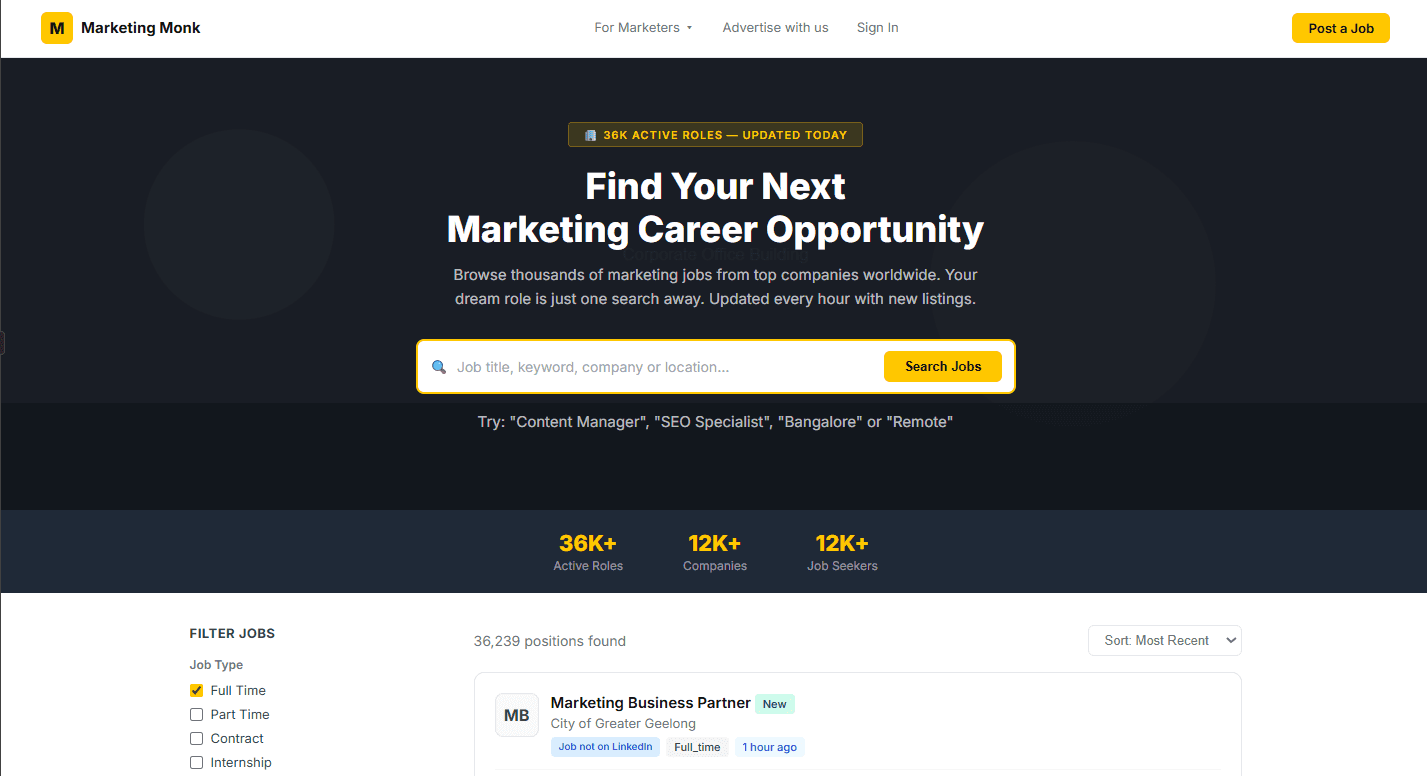
Before - One search box for everything
Before - One search box for everything
Job title, location, company — all crammed into a single field. Vague, unstructured, hard to use precisely.
Job title, location, company — all crammed into a single field. Vague, unstructured, hard to use precisely.
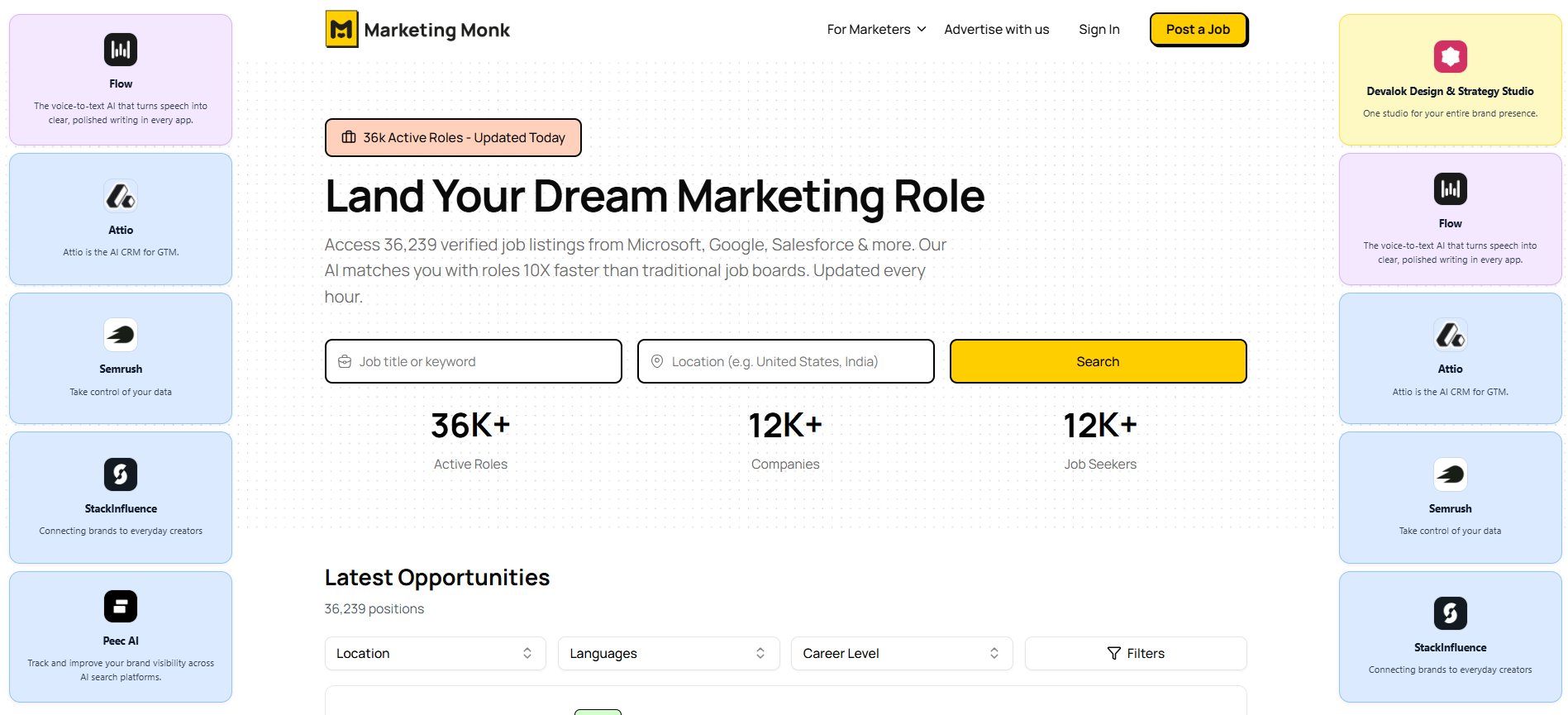
After - Separated job title + location fields
After - Separated job title + location fields
Two distinct inputs with a clear Search button. Users can search by role AND location simultaneously.
Two distinct inputs with a clear Search button. Users can search by role AND location simultaneously.
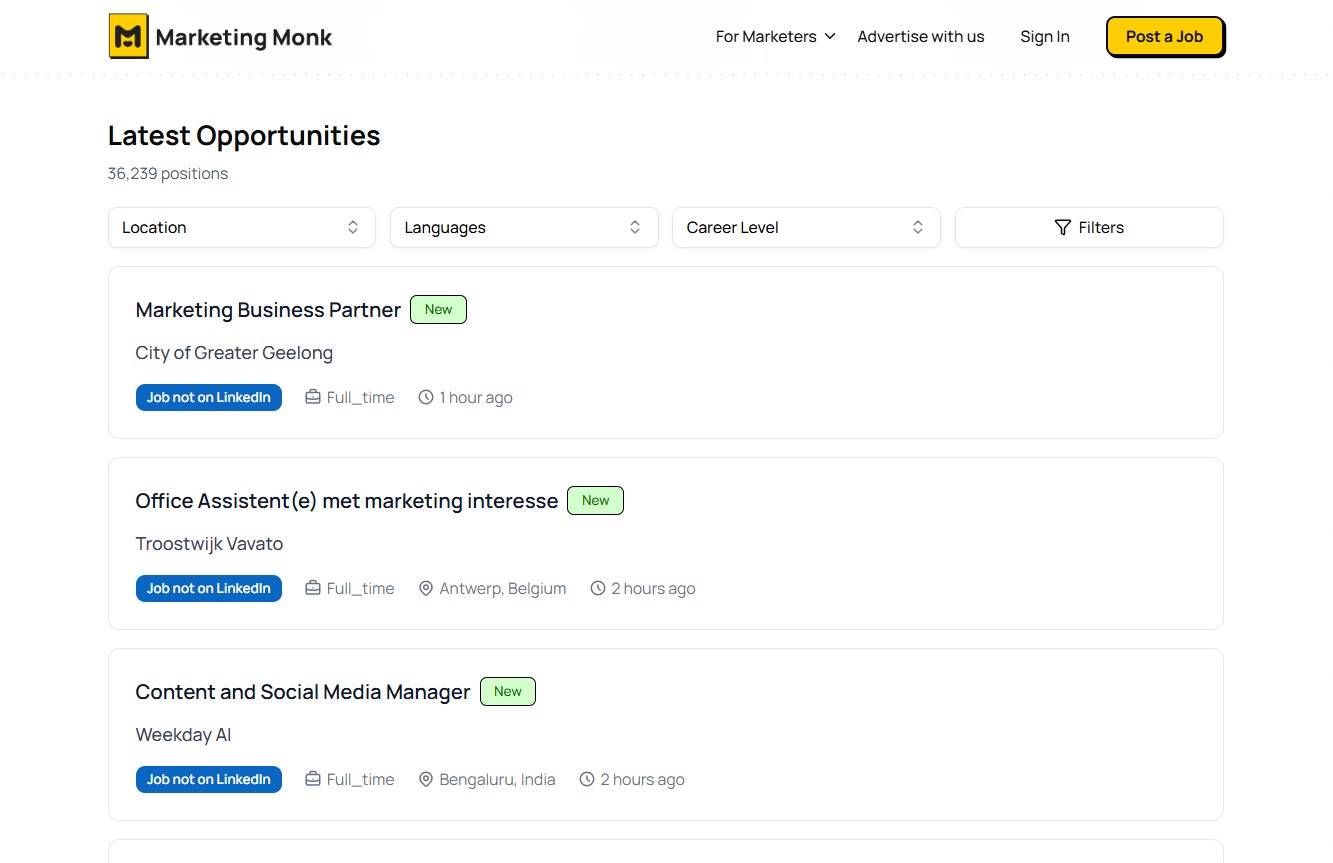
Job Listings - Clean listing cards with filters
Job Listings - Clean listing cards with filters
Location, Language, Career Level dropdowns added. Cards are clean, single click goes to job detail.
Location, Language, Career Level dropdowns added. Cards are clean, single click goes to job detail.
Job Details - Clear job detail with Easy Apply
Job Details - Clear job detail with Easy Apply
Single primary CTA — "Easy Apply". All job metadata structured in a scannable grid. No confusion
Single primary CTA — "Easy Apply". All job metadata structured in a scannable grid. No confusion
03 — Key Design Decisions
03 — Key Design Decisions
Four changes that
removed the confusion.
Four changes that
removed the confusion.
The old landing page was a newsletter archive — posts, categories, an email input buried below the fold. A new visitor had no idea what this was or why they should subscribe.
The redesign flipped the hierarchy completely — subscriber value first, content second.
The old landing page was a newsletter archive — posts, categories, an email input buried below the fold. A new visitor had no idea what this was or why they should subscribe.
The redesign flipped the hierarchy completely — subscriber value first, content second.
One card, one action — removed the dual CTA
One card, one action — removed the dual CTA
The "View Company" and "Apply Now" confusion was eliminated. Clicking a card now goes directly to the job detail page with a single "Easy Apply" CTA. One clear path. No hesitation.
The "View Company" and "Apply Now" confusion was eliminated. Clicking a card now goes directly to the job detail page with a single "Easy Apply" CTA. One clear path. No hesitation.
Separated search — job title field + location field
Separated search — job title field + location field
Split the single search box into two dedicated inputs — Job title or keyword and Location — with a prominent Search button. Users can now specify both dimensions precisely and simultaneously.
Split the single search box into two dedicated inputs — Job title or keyword and Location — with a prominent Search button. Users can now specify both dimensions precisely and simultaneously.
Added filters — Location, Language, Career Level
Added filters — Location, Language, Career Level
Three filter dropdowns added to the listings page — the feature that was completely missing before. 36,000 jobs now become navigable. Users can narrow to exactly what's relevant in two clicks.
Three filter dropdowns added to the listings page — the feature that was completely missing before. 36,000 jobs now become navigable. Users can narrow to exactly what's relevant in two clicks.
Hero with trust badges + stats above fold
Hero with trust badges + stats above fold
Added social proof — "36k Active Roles - Updated Today" badge, and three stats (36K+ roles, 12K+ companies, 12K+ job seekers). Trust signals before the search increase intent to engage.
Added social proof — "36k Active Roles - Updated Today" badge, and three stats (36K+ roles, 12K+ companies, 12K+ job seekers). Trust signals before the search increase intent to engage.
05 Impact
Cleaner experience,
clearer path.
Before
Two confusing CTAs per card
All search in one combined input
No filters on listing page
No hero or trust signals
Cluttered, hard to scan
After
Single "Easy Apply" — one click, one destination
Separate job title + location fields with clear Search CTA
Location, Language, Career Level filters added
36K badge + stats + headline above fold
Clean card hierarchy — scan and click in seconds

Job detail page restructured — metadata grid + single CTA
Job detail page restructured — metadata grid + single CTA
Filter feature designed and added from scratch
Filter feature designed and added from scratch
Search now supports role + location simultaneously
Search now supports role + location simultaneously
06 What I Learned
06 What I Learned
Confusion is
a conversion killer
Confusion is
a conversion killer
This project was a reminder that UX problems aren't always about missing features — sometimes it's about too many choices presented poorly. The dual CTA wasn't a missing button; it was two buttons fighting each other.
The fix wasn't adding more — it was removing ambiguity. Clarity is the fastest path to conversion.
This project was a reminder that UX problems aren't always about missing features — sometimes it's about too many choices presented poorly. The dual CTA wasn't a missing button; it was two buttons fighting each other.
The fix wasn't adding more — it was removing ambiguity. Clarity is the fastest path to conversion.
"When users don't know what to click,
they don't click anything. Remove the confusion first."
"When users don't know what to click,
they don't click anything. Remove the confusion first."
Next Case Study
Next Case Study